CCTV Video Analytics: Turning Existing Cameras into Operational Insight
by Ardy Maulana
See how Intelligent Camera adds on-site CCTV video analytics for visitor insights, occupancy monitoring and safety alerts without continuous cloud video…
Intelligent Camera turns the CCTV cameras a business already owns into a source of daily operational insight and real-time alerts. By adding CCTV video analytics to existing camera feeds, it helps businesses make better use of their security infrastructure without continuously streaming video to the cloud.
At a glance
Ready-made scenarios covering visitor insights, space operations, safety, security, attendance, and barcode reading.
Actionable outputs: Trend dashboards for managers, real-time incidents for operators, and operational records.
On-site analysis: Video is processed where it is recorded. The cloud receives analytics and incident data rather than a continuous video feed.
Privacy by design: Data handling decisions were shaped by Indonesia's Personal Data Protection Law (UU PDP, Law No. 27 of 2022).
The challenge: cameras everywhere, insight nowhere
Most stores, offices, stations, and factories already run dozens of CCTV cameras, yet almost none of that footage is ever watched. Video is recorded, stored, and usually reviewed only after something has gone wrong.
Meanwhile, managers still answer everyday operational questions by hand or by guesswork:
How many people actually visited today, and when were we busiest?
Is this room or car park over capacity? How long is the queue?
Are workers wearing their safety gear? Did the guard complete the patrol?
Who arrived late this morning?
The cameras already see the answers. What is missing is a way to turn what they see into numbers and alerts that people can act on, without requiring a team to stare at screens or creating unnecessary privacy risks.
The solution: CCTV video analytics on top of existing camera
Intelligent Camera adds video analytics to the cameras a site already has. Video is analyzed on-site, using a dedicated device or an existing Windows PC, and the results are sent to a cloud dashboard.
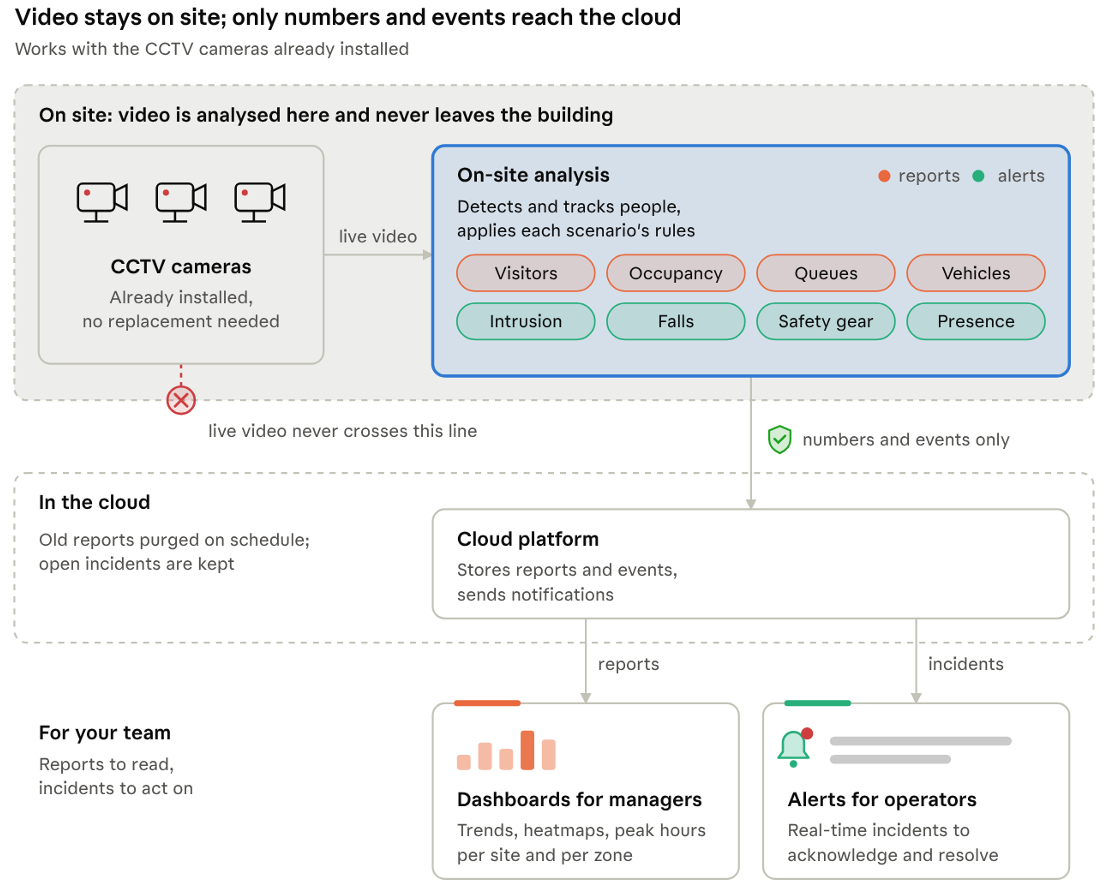
The camera feed stays within the building. Instead of receiving continuous video, the cloud receives counts, statuses, and incident records. A still snapshot may also be attached to an incident as evidence.
Getting a site running involves three steps:
Connect. Existing cameras feed the on-site analysis. Several cameras can be grouped into one area, such as an entire store floor.
Configure. In the dashboard, select a scenario, draw zones or counting lines on the camera view, and define operating schedules and alert rules.
Act. Managers review trends and operational reports, while operators receive alerts when incidents are detected.
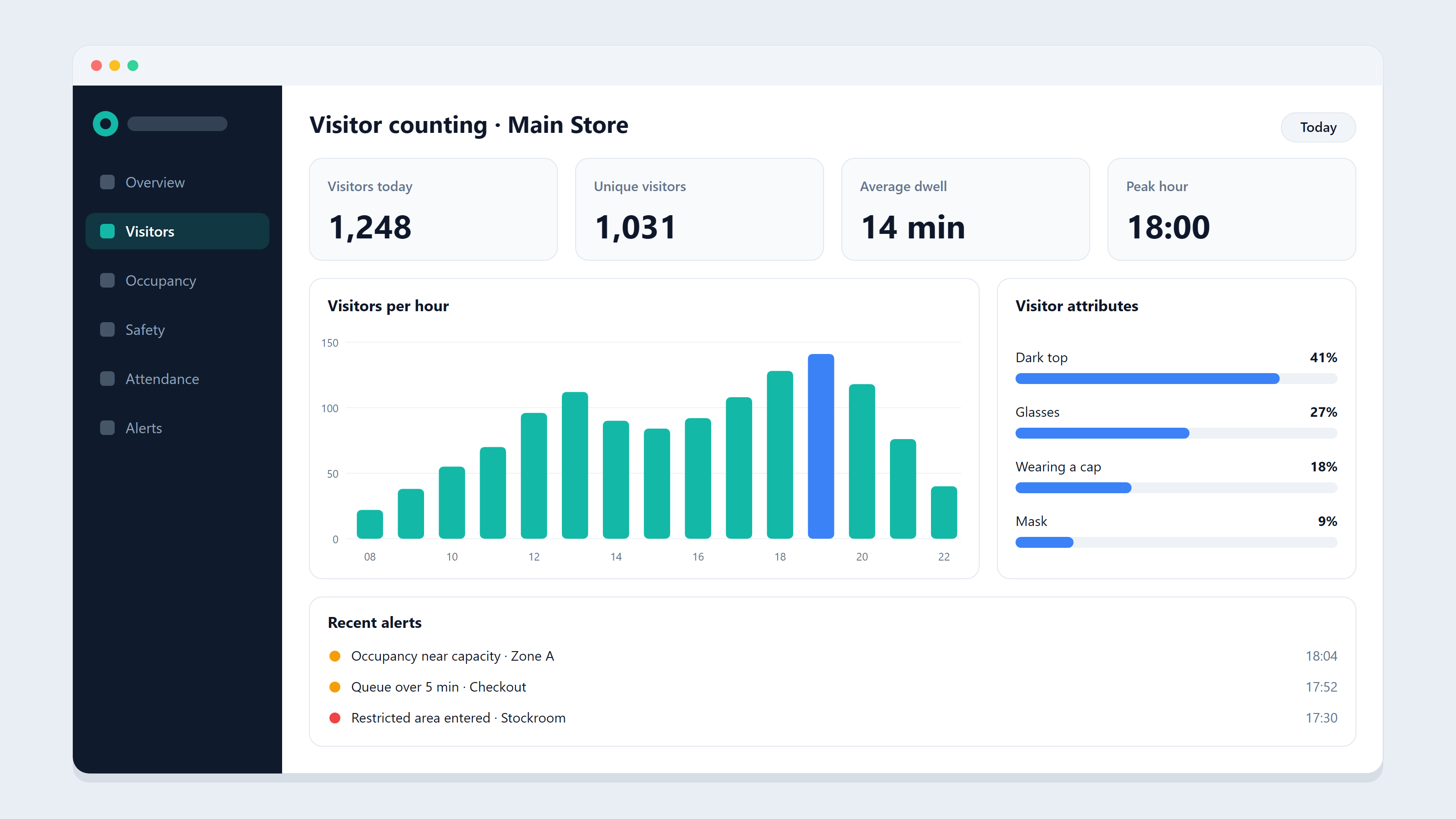
Illustration of the manager dashboard; figures are examples.
The platform primarily delivers two types of output:
Analytics: Regular summaries, including counts, trends, heatmaps, and peak hours. These help managers and business owners understand operational patterns.
Triggers: Individual events with notifications and workflows to acknowledge and resolve incidents. These support security, safety, and operations staff who need to respond to specific situations.
Some scenarios combine analytics with alerts, while attendance and barcode reading generate operational records.
When the internet connection drops, events are queued on-site and delivered once connectivity returns, helping prevent incidents from being lost during short outages.
What Intelligent Camera covers: video analytics for everyday operations
Intelligent Camera provides a library of scenarios organized around the questions businesses need to answer.
CCTV video analytics allows a single camera to support multiple operational scenarios. For example, the same entrance camera can count visitors, monitor occupancy, and check safety gear.
Understand your visitors
Visitor analytics can help businesses understand traffic patterns, visitor characteristics, and engagement with physical spaces or displays.
Visitor counting
Track how many people enter a location, identify unique visitors per day, and understand how long they stay. Counting can work across entrance lines, rooms, aisles, and multiple cameras grouped into one area.
This scenario provides analytics that help managers understand daily visitor traffic and patterns across different locations.
Visitor attributes
Understand what visitors look like as a group using attributes defined by the business, such as clothing colour, headwear, glasses, masks, and age groups.
This analytics scenario provides a view of visitor characteristics without identifying individuals by name.
Display attention
Measure how many people pass a screen, display, or shelf, how many look at it, and how long they engage with it.
These analytics can help businesses understand attention patterns around physical displays and customer-facing spaces.
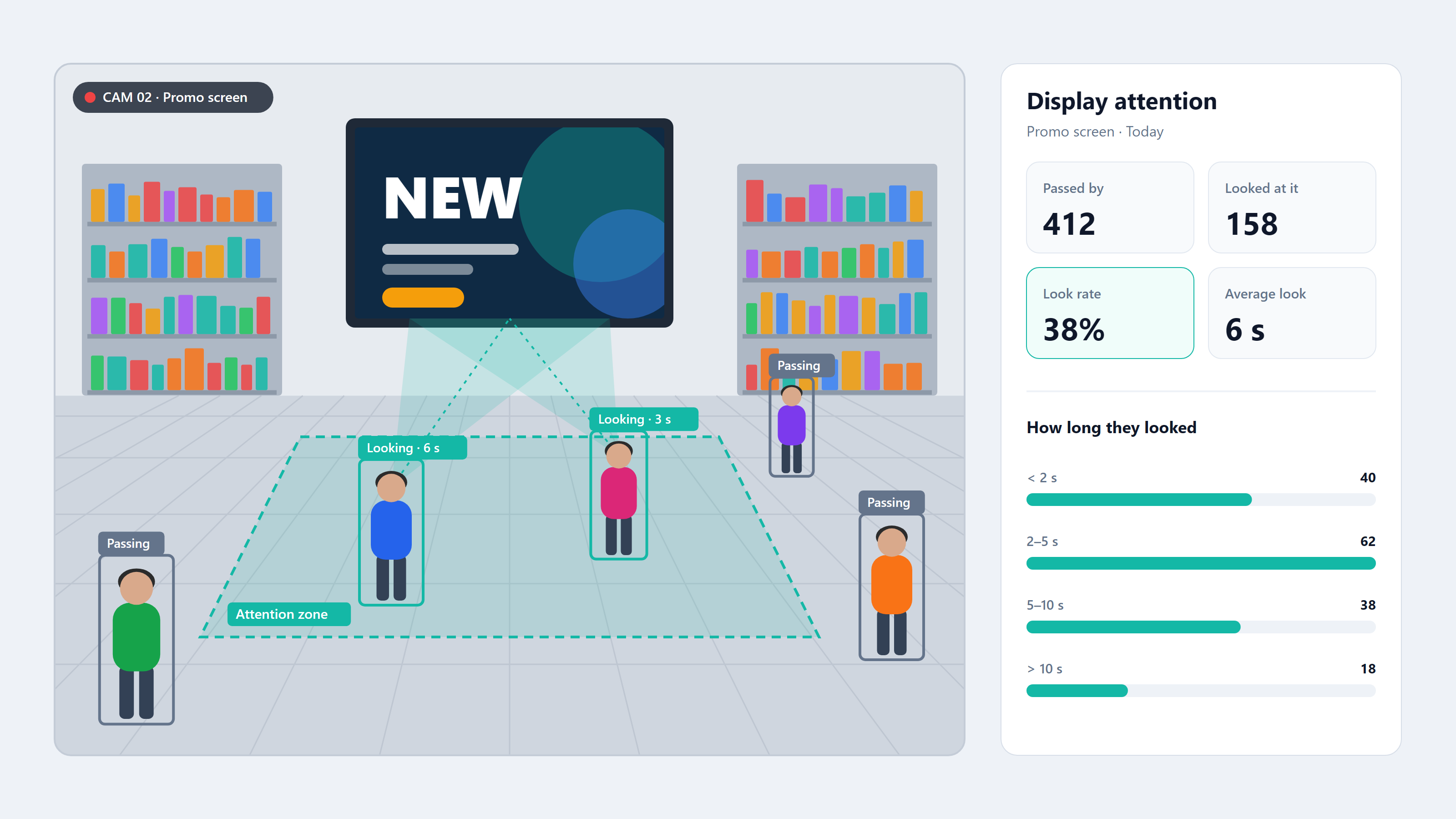
Display attention: who passed the screen, who looked, and for how long. Illustration; figures are examples.
Run your space
Beyond visitor traffic, video analytics can help teams monitor how physical spaces are being used throughout the day.
Occupancy & capacity
Monitor how full each zone is in real time through a colour-coded zone map showing whether an area is OK, near capacity, or over capacity.
This scenario combines occupancy analytics with alerts when configured capacity conditions are reached.
Queue monitoring
Monitor queue lengths and identify how many people give up waiting and leave.
The resulting analytics help operations teams review queue patterns and understand how waiting areas are being used.
Space utilization & parking
Understand how much of each physical space or parking area is currently being used.
These analytics give managers visibility into utilization patterns across different areas of a facility.
Vehicle counting
Count how many vehicles pass or enter a location and identify when traffic peaks.
This scenario combines traffic analytics with alerts to support monitoring of vehicle movement.
For operations teams, these capabilities provide a way to review space utilization, spot congestion, and respond when occupancy approaches configured limits.
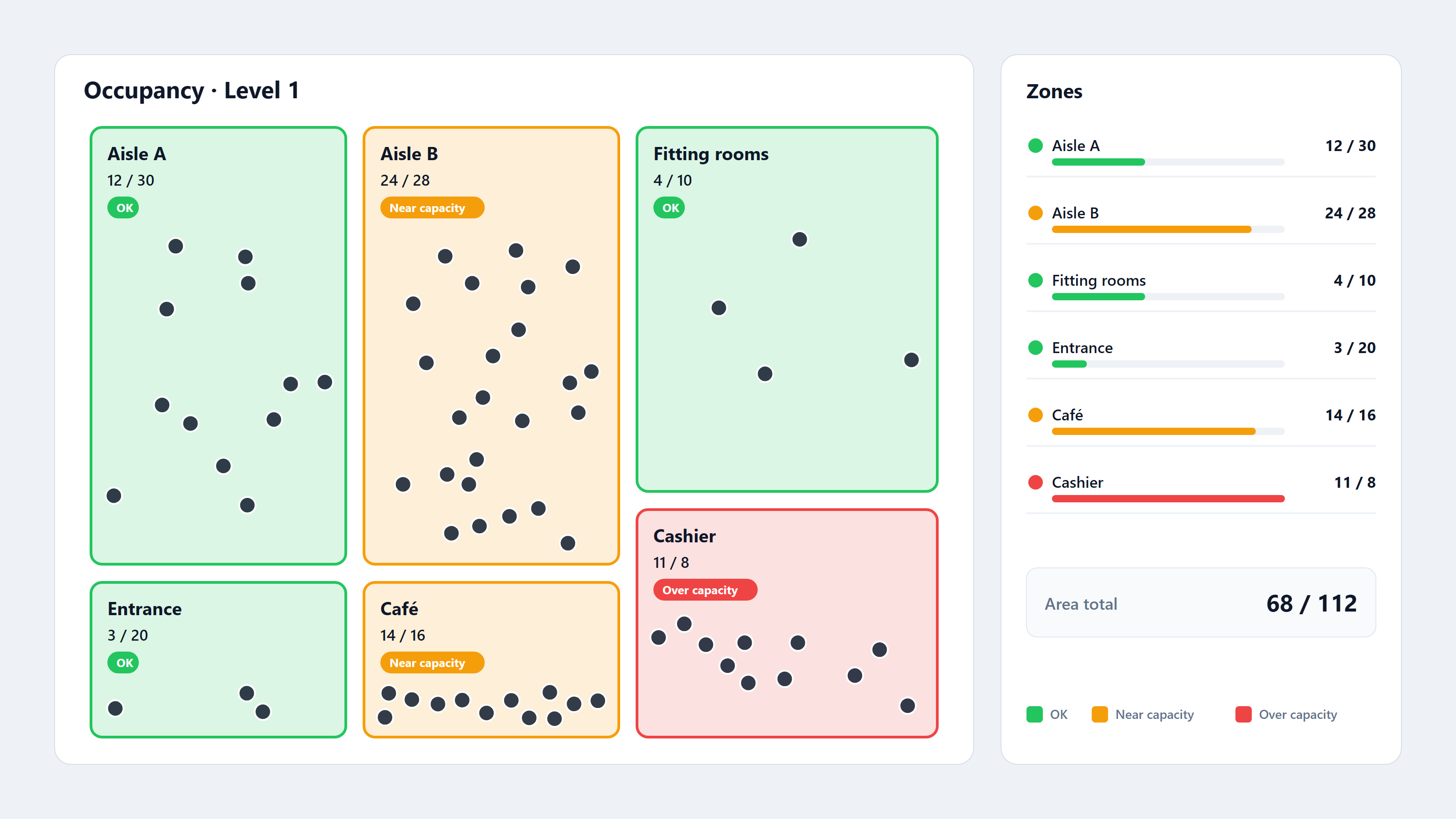
Occupancy zone map: each zone shows its live count against capacity. Illustration; figures are examples.
Keep people and places safe
Some situations require immediate attention rather than a scheduled report.
Intelligent Camera uses event-based scenarios to identify conditions that may need action from security, safety, or operations personnel.
Restricted area intrusion
Detect when someone enters an area they should not be in.
The system creates an incident that security personnel can review and respond to.
Behaviour alert
Detect when someone in a defined zone continues a specified behaviour, such as using a phone, eating, or carrying a box.
These behaviours are monitored according to the rules configured for the area.
Fall detection
Identify when a person has fallen and may require assistance.
The system generates an incident so the appropriate personnel can review the situation.
Safety compliance
Detect when a worker is missing required safety equipment, such as a helmet, vest, or seatbelt.
Alerts are generated according to configured detection rules, supporting safety monitoring in operational environments.
Presence & absence
Identify when a designated post has been left unattended or when a guard misses a patrol checkpoint.
This scenario helps security and operations teams monitor expected personnel presence.
Instead of relying only on someone watching a camera feed, these scenarios create incidents that operators can review, acknowledge, and resolve.
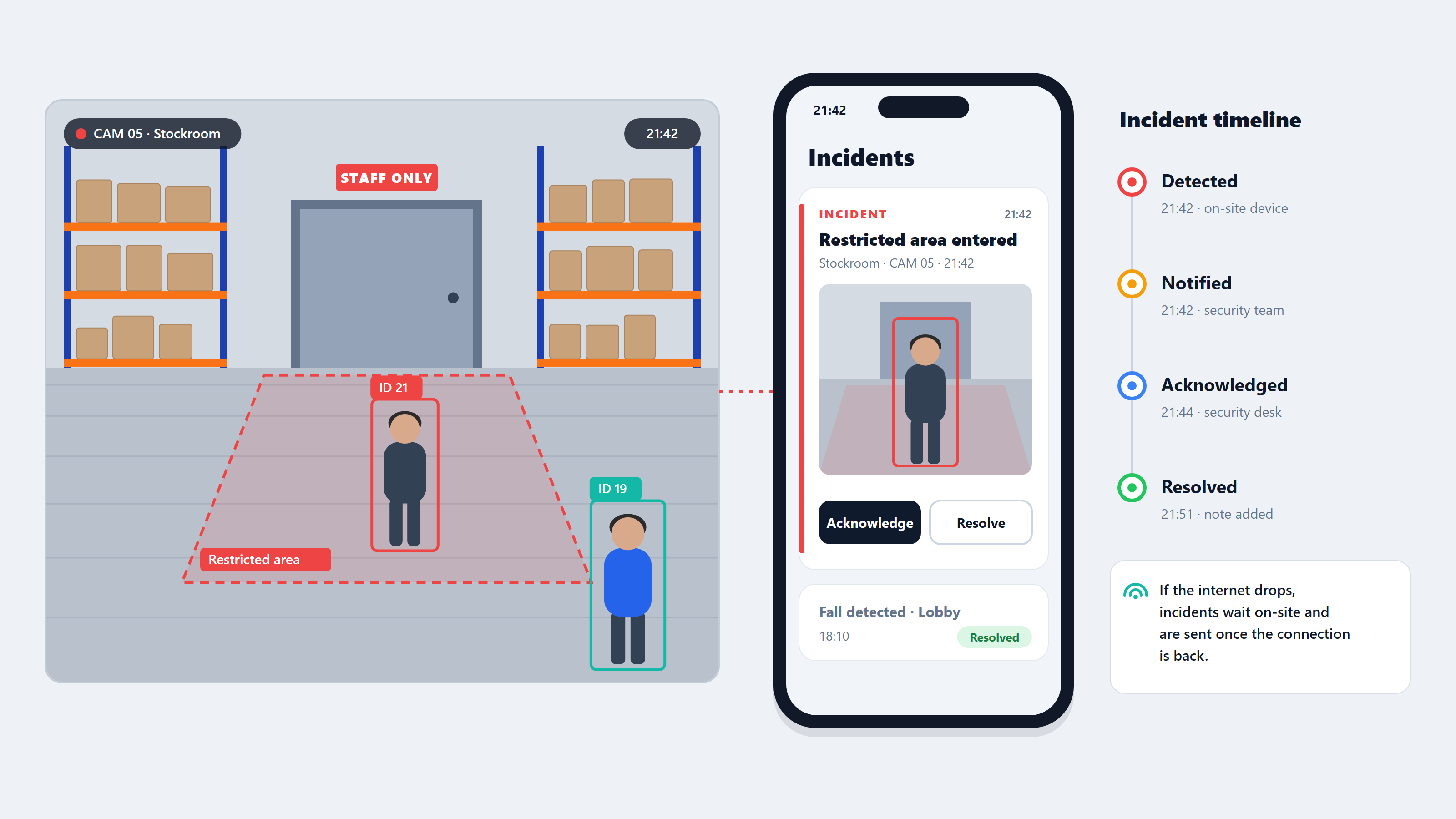
A real-time incident from detection to resolution. Illustration; times are examples.
Keep records automatically
Other scenarios focus on capturing operational records from visual information.
Attendance
Record employee check-in and check-out activity, including late arrivals and absences, for employees who have provided consent.
This scenario generates attendance records based on the configured recognition process.
Barcode reading
Identify which barcodes pass through a designated reading zone and record how many are valid.
This scenario supports operational recordkeeping by capturing barcode information automatically.
The same underlying building blocks support these scenarios: detection, tracking, zones, counting lines, and dwell time.
This shared foundation also makes it possible to introduce new scenarios without building a completely new camera infrastructure.
Numbers and alerts people can trust
CCTV video analytics is only useful when people can trust the numbers and alerts it produces. Intelligent Camera is designed so that reported figures can be checked and alerts can be reviewed before they are treated as confirmed incidents.
Several design decisions support that goal.
Every count can be traced
A safety violation is counted only when it meets the configured alert rule. For example, a missing helmet must be detected for longer than the specified time, inside the defined zone, and during working hours.
Each counted violation appears in the list with its evidence, keeping the reported number aligned with the underlying records.
People review borderline cases
Cases that fall just below the alert rule are retained as potential violations with a snapshot.
A supervisor marks each one valid or invalid, helping prevent false alarms from entering reports without overlooking possible problems.
Incidents follow a clear workflow
Each real-time incident can be acknowledged and resolved, with notifications routed to the appropriate channel.
This gives operators a structured way to manage detected events from notification through resolution.
Charts follow the site's actual operating hours
Hourly charts reflect the configured schedule rather than displaying 24 mostly empty hours. Durations are shown at the time they occurred.
New sites are easier to configure
Users can click on a camera view to outline a zone instead of manually drawing every corner.
When preparing a new object type, they can enter a description such as "hard hat" to receive suggested labels.
These details matter because operational analytics must support decisions, not simply produce more numbers.
A count should be explainable. An alert should have a clear reason for being triggered. And when a result is uncertain, people should have a way to review it.
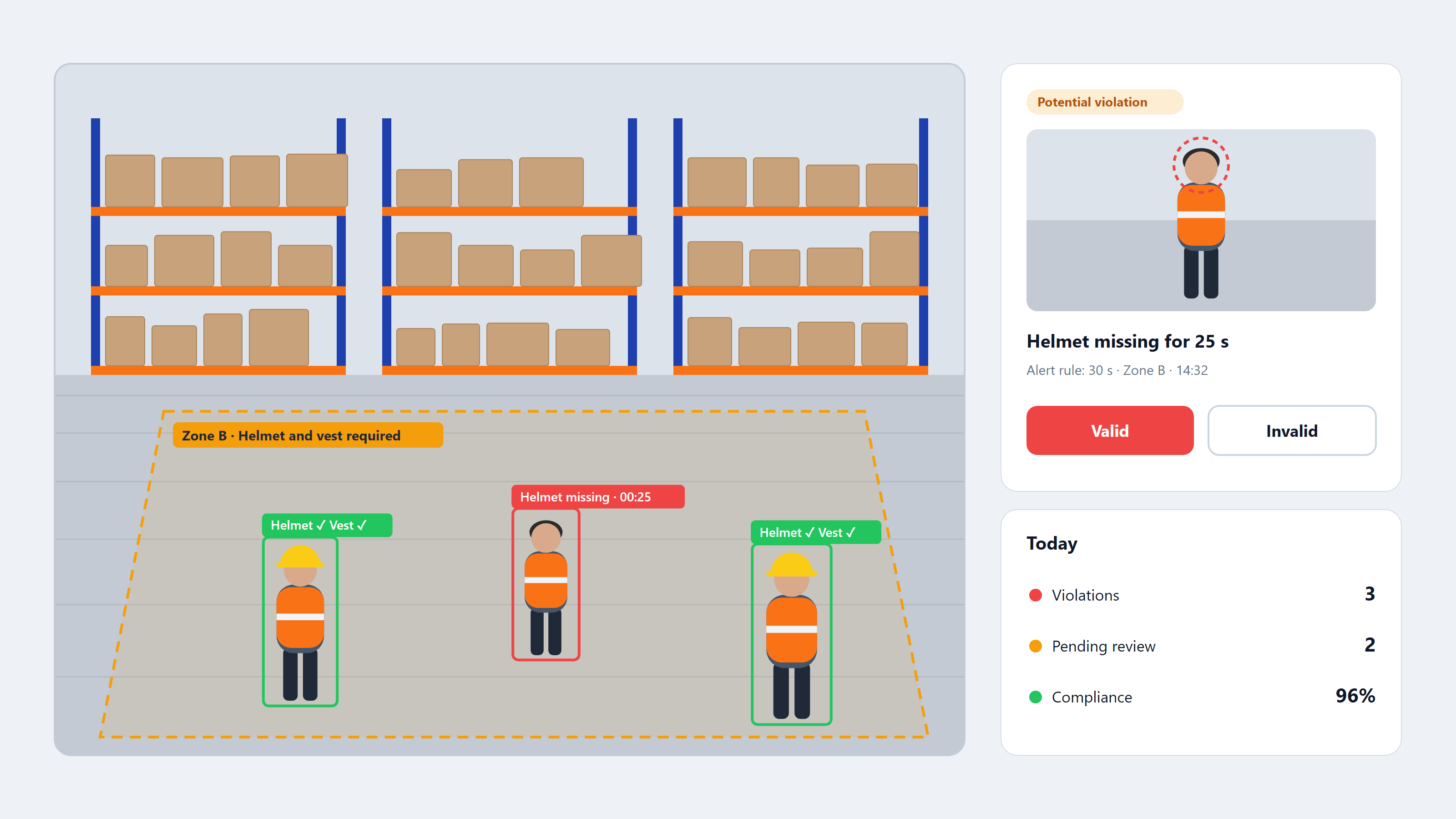
Safety compliance: a borderline case waits for a supervisor's valid or invalid decision. Illustration; figures are examples.
Privacy by design: keeping video analysis on-site
The value of video analytics depends not only on what the system can detect, but also on how it handles the information it processes.
For Intelligent Camera, privacy was treated as a design requirement from the beginning, with decisions shaped by Indonesia's Personal Data Protection Law (UU PDP, Law No. 27 of 2022).
Its approach centres on analyzing footage locally, limiting what is transmitted, and giving businesses control over how information is handled.
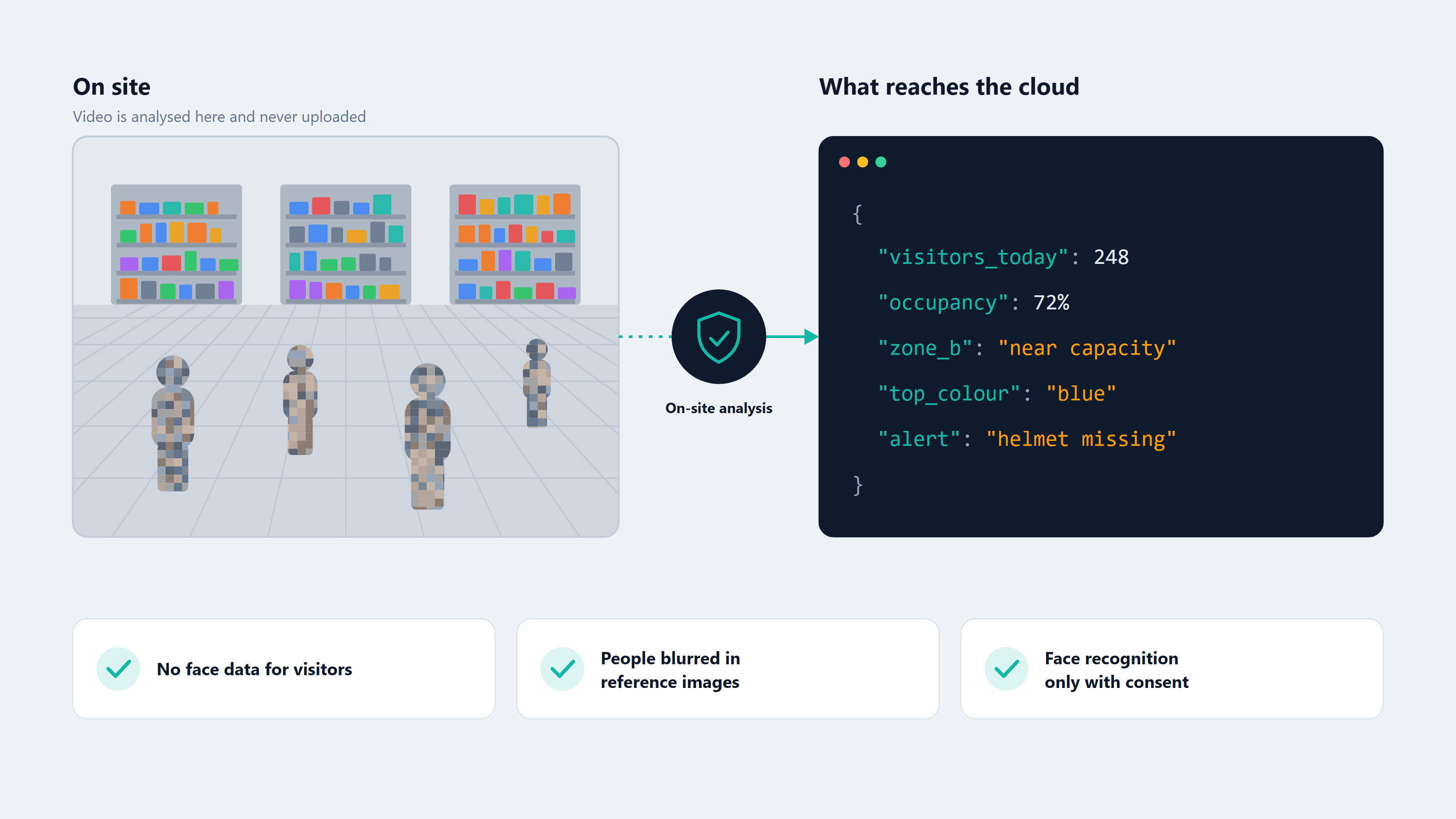
Video stays on-site
Footage is analyzed where it is recorded. The cloud receives counts, statuses, and incident records rather than a continuous camera feed.
A still snapshot is attached only when used as incident evidence. There is no continuous video upload or live video feed on the dashboard.
People are blurred before reference images leave
The occupancy zone map uses a single reference picture of the space.
Every person appearing in that picture is pixelated and blurred before the image leaves the site.
Visitor counting is anonymous
Unique visitors are recognized using general appearance rather than facial identity.
The data remains in memory, is never written to disk, and is cleared daily.
Visitor attributes leave as words, not images
Visitor attributes are analyzed on-site. Only descriptive results, such as "blue top, wearing a cap", are transmitted.
An on-site model is used instead of a cloud AI service so the images are not sent to third-party services or abroad.
Face recognition is limited to consent-based attendance
Employee consent is recorded before any photo is accepted.
Unknown faces are never stored or sent. Revoking consent permanently removes the associated photos and face data, including from the on-site device at its next sync.
The client stays in control
The business acts as the data controller.
Sensitive features are enabled only after the client accepts versioned terms, while consent and configuration changes are recorded in an audit log.
Data is not retained indefinitely by default
Report retention is configurable, and older reports are purged on schedule.
Unresolved incidents are not deleted silently.
AI models are selected for commercial use
Models are chosen with licences that permit commercial use.
Models restricted to research or specific hardware vendors are excluded from deployment.
These choices aim to provide the benefits of video analytics while limiting unnecessary data movement and retention.
For businesses considering CCTV video analytics, understanding which data stays on-site, what reaches the cloud, and how sensitive information is controlled is as important as understanding the analytical features.
Getting accuracy right: measure, then fix
The team chose models by testing them against evidence, not by reputation, and treated inaccurate results as problems to investigate rather than hide.
Visitor counting: from overcounting to a dedicated model
The first version recognised returning visitors by their general appearance.
On one real day, it counted 156 visitors when there were approximately 32 actual people. The system could not reliably distinguish individuals, leading to substantial overcounting.
Rather than accepting the result, the team took three steps:
Built a test bench that replays recorded footage through the exact counting logic used on-site.
Compared three candidate models using both a public benchmark and the team's own recordings.
Switched to a dedicated person re-identification model with a licence permitting commercial use.
On an office recording, the new model reported 57 visitors, compared with 111 from the previous approach.
On the public benchmark, it counted 40 visitors for 32 actual people.
These results showed improvement, but also demonstrated that accuracy still required attention.
Site-specific tuning continues, with the goal of producing accurate counts out of the box without requiring per-site training.
Visitor attributes: two models, 1,024 real crops
The team also evaluated two zero-shot image models using 1,024 person images collected from six real locations.
This testing revealed that wording can influence how the models interpret visual attributes.
For example, a description such as "a person without a mask" can confuse these models. To address this, attribute options are written as neutral descriptions rather than negative statements.
Face-level attributes, including glasses and masks, are also analysed using only the head area of the image.
Licences checked before accuracy
Model performance was not the only selection criterion.
A model that performed well but relied on research-only training data was used for comparison purposes only. Another model restricted to a single hardware vendor was excluded.
The goal was to select models that could be used commercially, not merely those that produced promising benchmark results.
Together, these evaluations reflect an approach in which accuracy, practical deployment, and licensing are considered before introducing AI models into business operations.
What's next: measuring performance in real-world pilots
Intelligent Camera is moving from development into its first site pilots.
Each pilot will focus on measuring outcomes that matter to the business:
Visitor count accuracy: Comparing automated counts against manual counts taken on the same day.
Alert quality: Measuring the proportion of alerts that supervisors confirm as real incidents.
Setup time: Tracking the time required from connecting the cameras to producing the first dashboard.
Operational effort: Measuring staff hours no longer spent watching screens or counting manually.
These measurements will help the team understand how the system performs in everyday environments and where further refinement is needed.
The bottom line: turning existing cameras into useful information
The cameras are already on the wall.
Intelligent Camera makes them answer the questions managers ask every day, delivers alerts to the people who need to act, and does so without continuously streaming video off-site.
The goal is not to collect more footage. It is to make better use of the footage businesses already have.
If your team is exploring how video analytics could support your existing operations, contact Moonlay to discuss the operational questions and measures worth evaluating in a pilot.